> For the complete documentation index, see [llms.txt](https://docs.inqud.com/llms.txt). Markdown versions of documentation pages are available by appending `.md` to page URLs; this page is available as [Markdown](https://docs.inqud.com/on-ramp/get-started/setup-instructions.md).
# Setup instructions
**Why do you need to create a widget?**\
A project represents an entity through which interaction with Inqud is conducted. By creating different projects, you can separate the flow of funds, which allows for more efficient financial operations. For example, if a merchant has two websites, they can create two separate projects with individual settings for each. This will not only separate the flow of funds but also allow unique parameters for each project, enabling more flexible management.
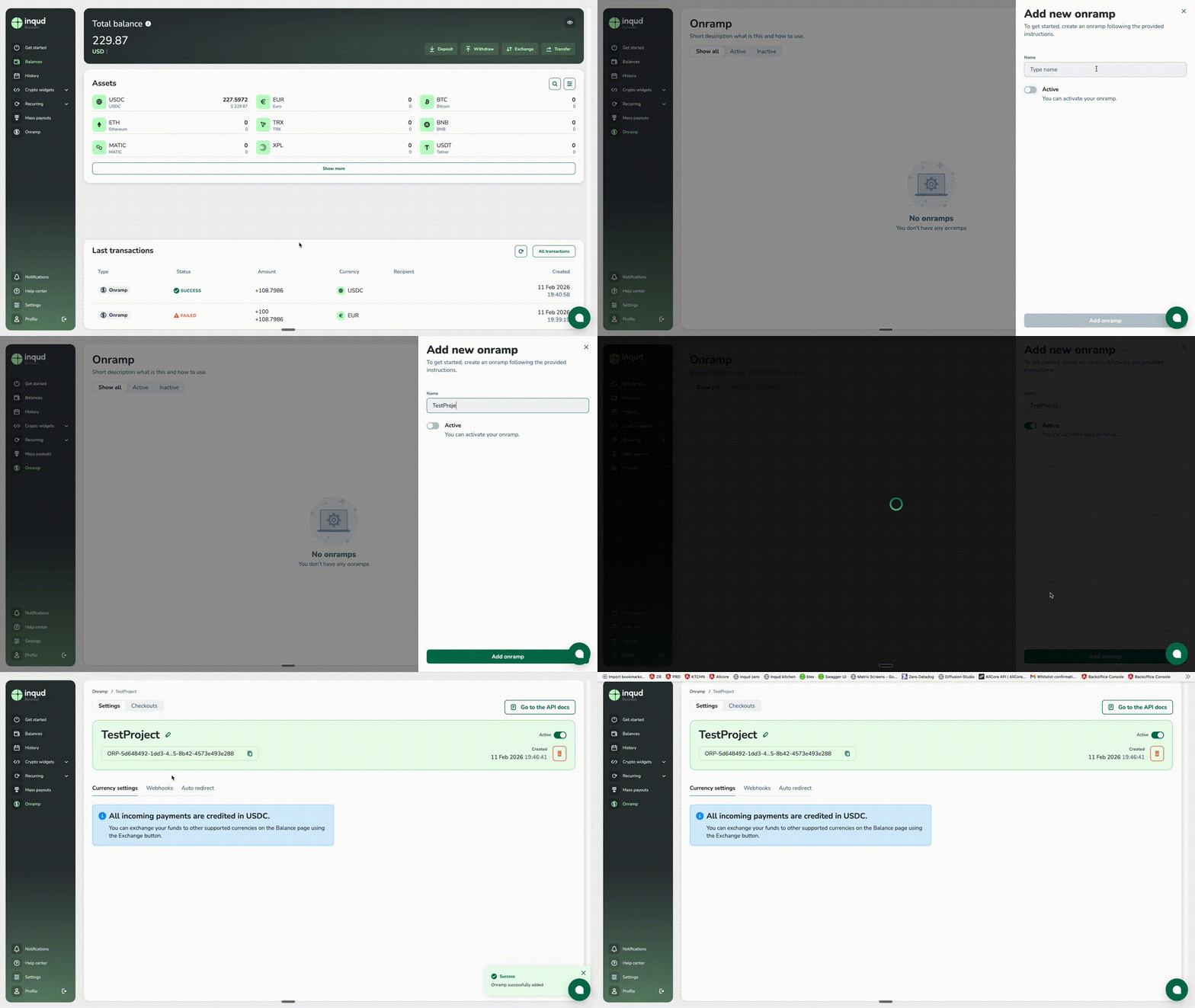
### **How to create a new on-ramp project**** (required step)**
To create a new project, follow these steps:
1. Go to your dashboard.
2. Open the **On-Ramp** page.
3. Click on **Add new onramp**.
4. Enter the name of the widget in the form that appears.
5. Set the activation status using the **Active** toggle.
{% hint style="info" %}
You can activate or deactivate the widget at any time.
{% endhint %}
Also webhooks can be set up via [Project API docs](https://docs.zero.z1.wtf/#tag/on-ramp-projects)
### **Checkouts**
Checkouts can be created only via API [Checkout API docs](https://docs.zero.z1.wtf/#tag/on-ramp-checkouts)
### **Webhooks**** (recommended step)**
You need to set up webhooks for **Checkouts**.
1. Click **Add**.
2. Enter the webhook URL (mandatory field) in the form that appears.
3. Optionally, provide a **Webhook secret**.
4. Click **Submit** to save the settings.
Also webhooks can be set up via [Webhooks API docs](https://docs.zero.z1.wtf/#tag/on-ramp-webhooks)
### **Reusable KYC via Sumsub**** (recommended step)**
If the integrating party also uses **Sumsub** for identity verification, we strongly recommend supporting the **Reusable KYC** flow.\
[Shared KYC](/on-ramp/integration/shared-kyc.md)
.gif?alt=media&token=80f59012-edf0-464b-a7be-3af5a590795a)